Anime Character Maker
Create a full-body anime character online: pick the look from options, then keep editing the result.
Design your character
Full-body character on a white background.
Sign up to get 10 free credits, enough for your first character.
This anime character maker is an online anime character creator that builds a full-body character from visual options instead of a text prompt or an upload. Choose gender, hair color and hairstyle, eye color, outfit, expression, pose, art style and optional accessories, then click Create character and let the AI draw a new anime character on a clean white background. Use it as an anime avatar maker for a profile picture, as a character generator for a story or game concept, or as an anime OC maker when you want to make an anime character fast. The Random button picks a whole look, each image costs 7 credits, and new accounts get 10 free credits. Free-credit runs may wait briefly in a queue.
Why use Anime Character Maker
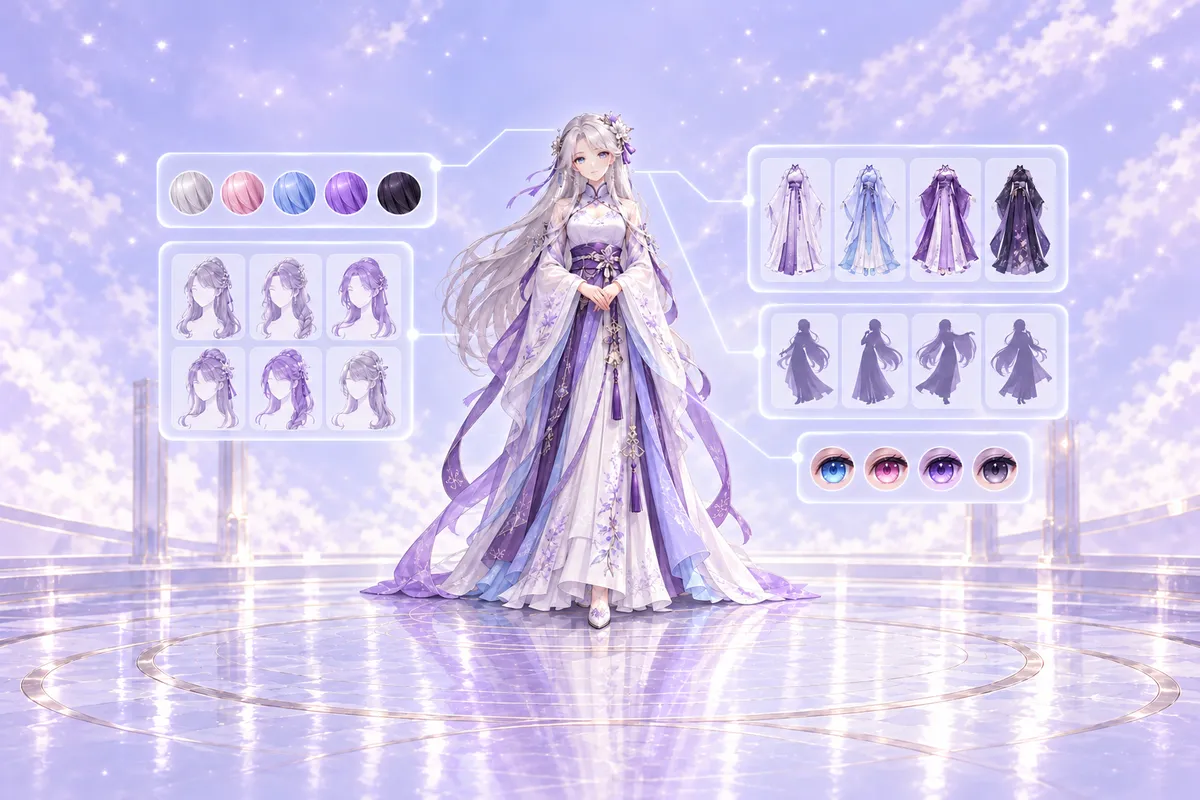
How the Anime Character Maker Works
You begin by choosing a gender, then pick from visual thumbnails for hair color, hairstyle, eye color, outfit, expression, pose and art style. There is no free-text prompt to write, so you can make an anime character by clicking options instead of guessing at model keywords. When you press Create character, the anime character maker turns your choices into a prompt and the AI draws a new full-body anime character on a clean white background.
Anime Character Maker Options for Girls and Boys
The anime character creator gives you separate hairstyle and outfit lists for girls and boys, so the look you build matches the character you have in mind. Girls can choose from options like long straight, twintails, ponytail, bob cut, braid and hair bun, while boys can pick short neat, spiky, messy, undercut or slicked back styles. Each option has a small preview thumbnail, which makes it easy to compare looks before you generate your anime avatar.
Anime Character Maker Hairstyles and Hair Colors
You can pair any hairstyle with hair colors such as black, brown, blonde, silver, pink, blue, red and purple, then set the eye color to blue, green, red, golden, purple or brown. This level of control helps you make an anime character that feels original rather than pulled from a fixed set of pre-drawn parts. Hair and eye colors are shown as color swatches, so you can see the choice at a glance and change it as often as you like before you spend a credit.
Anime Character Maker Outfits, Expressions and Poses
Dress your character in a casual hoodie, casual dress, kimono, hanfu, business suit, fantasy armor, cyberpunk jacket or shrine maiden outfit. Then choose an expression such as smile, gentle, serious, surprised, shy or cool, and pick a pose like standing, sitting, arms crossed, hand on hip, waving or looking back. Optional accessories like glasses, cat ears, a hair ribbon, headphones, a scarf and earrings add the final personal detail to your anime OC.
Anime Character Maker Art Styles and Random Look
Choose modern anime, retro 90s anime, watercolor or flat color as the art style for your anime avatar maker session. If you are not sure where to start, the Random button picks a whole look across gender, hair, eyes, outfit, expression, pose and art style. The result is a newly drawn anime character, not a mix of fixed parts, so every character design feels fresh and usable.
Anime Character Maker for Avatars, Stories and Game Concepts
An anime character maker is useful whenever you need a character visual quickly. Writers and role-players can picture a lead character before drafting a scene, visual novel and game makers can sketch a character concept to react to, and creators can make an anime avatar for a profile picture, a sticker or a channel icon. Because you pick options instead of writing a prompt, you can make an anime character even if you have never used an AI image tool, and the Random button helps when you only have a loose idea.
Anime Character Maker Download, Enlarge and Transparent PNG
Under the finished image you will find buttons to download the character, enlarge it and remove the background. The background remover returns a transparent PNG, which is handy when you want to place the anime character on a banner, a slide or a character sheet. The same result screen opens the Pose Changer, the Clothes Changer and the Background Remover with your character already loaded, so you can keep working on one character without uploading it again.
Tips for Better Anime Character Maker Results
Start with the outfit, because it sets the mood of the whole character, then choose hair and eye colors that either match it or contrast with it on purpose. Pair a gentle expression with a standing pose for a clean character sheet, or a smile with a waving pose for a friendly avatar. If a result is close but not right, change one option at a time and create the character again, so you can see which choice made the difference. Failed runs are refunded automatically.
How to use Anime Character Maker
- 1
Pick Your Character Options
Choose gender, hair color, hairstyle, eye color, outfit, expression, pose, art style and optional accessories from visual thumbnails. You can also press Random to get a full look instantly, then tweak any option that does not fit.
- 2
Create and Download
Click Create character and the anime character maker draws a full-body character on a white background for 7 credits. Download the image, remove the background to get a transparent PNG, or enlarge it for your avatar or character sheet.
- 3
Edit Pose or Clothes
Open the Pose Changer, the Clothes Changer or the Background Remover with your character already loaded. No second upload is needed, so you can keep refining the same anime OC without rebuilding the look.